> ## Documentation Index
> Fetch the complete documentation index at: https://ophel.app/docs/llms.txt
> Use this file to discover all available pages before exploring further.
# Ophel browser permissions: what they are and why
> Every permission Ophel requests explained — what each one enables, when the browser prompts you, and what gets disabled when you revoke it.
Ophel requests only the permissions it needs to operate. Required permissions are declared in the extension manifest and granted when you install Ophel. Optional permissions are never granted silently — your browser asks you the first time a feature that needs one is activated, and you can revoke any of them later from **Settings → Permissions**.
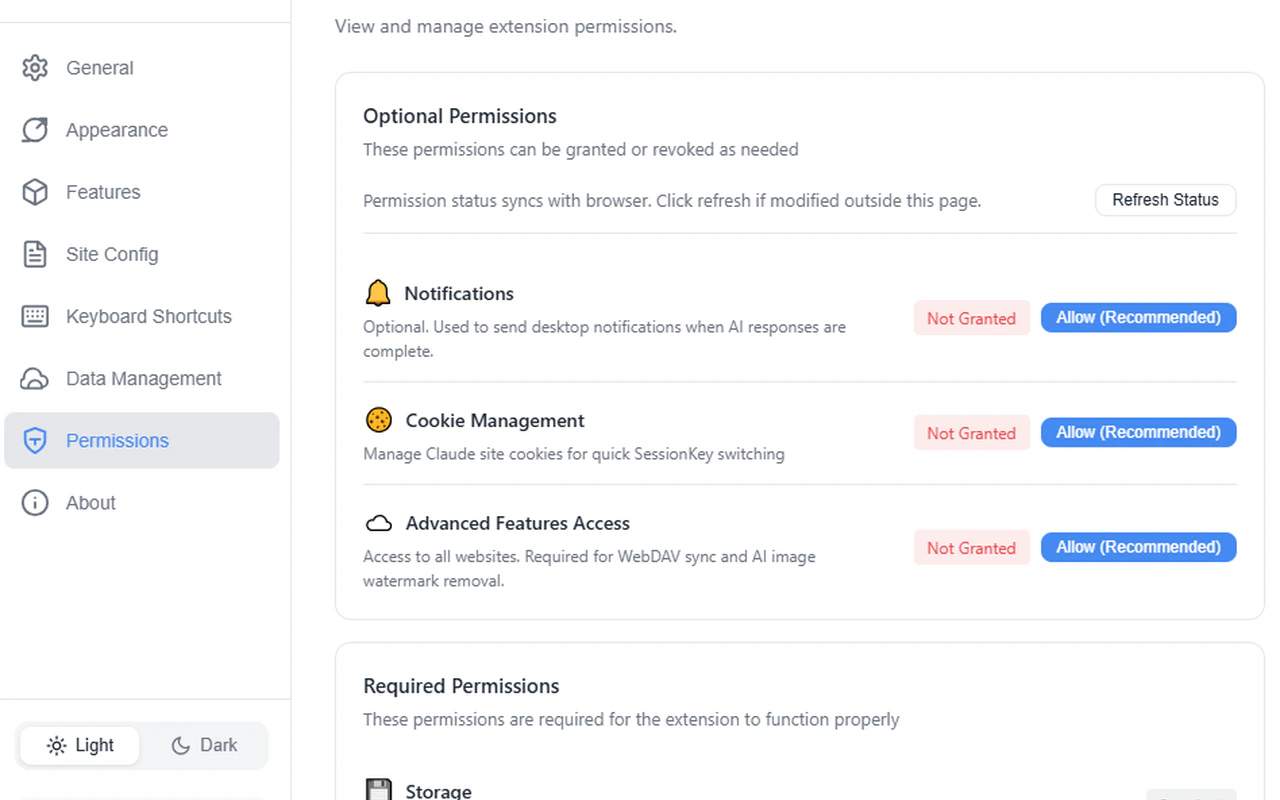 ## Required permissions
These permissions are always active. Ophel cannot function without them.
| Permission | Purpose |
| ------------------------------------- | ---------------------------------------------------------------------------------------------- |
| `storage` | Save your settings, prompts, folders, tags, and conversation metadata in browser local storage |
| `declarativeNetRequestWithHostAccess` | Apply declarative network request rules on Claude pages (used for header modifications) |
## Optional permissions
These permissions are off by default. Ophel requests each one through a browser prompt the first time you use a feature that depends on it.
| Permission | What it enables |
| --------------- | ------------------------------------------------------------------- |
| `notifications` | Desktop notification when AI response generation completes |
| `cookies` | Reading and switching Claude Session Keys for multi-account support |
| `` | WebDAV sync requests to your own server, and watermark removal |
## Granting a permission
You do not need to grant optional permissions manually in advance. When you turn on a feature that requires one — for example, enabling WebDAV sync or the completion notification — your browser displays a standard permission prompt. Click **Allow** to grant it.
If you dismissed a browser permission prompt by accident, go to **Settings → Permissions** and use the grant controls there to trigger it again.
## Revoking a permission
Go to **Settings → Permissions**. Each optional permission has a **Revoke** button. After you revoke a permission, any features that depend on it are automatically disabled — you do not need to turn them off individually.
| Permission revoked | Features automatically disabled |
| ------------------ | ---------------------------------------- |
| `notifications` | Desktop completion notifications |
| `cookies` | Claude Session Key reading and switching |
| `` | WebDAV sync, watermark removal |
Revoking `` disables both WebDAV sync and watermark removal at the same time, because both features depend on broad host access. If you only want to disable one of them, turn it off in its own feature settings instead of revoking the permission.
## Frequently asked questions
WebDAV servers can be hosted at any URL — there is no fixed hostname Ophel can request permission for in advance. The `` permission allows Ophel to make a network request to whatever server address you configure. The request goes only to your own WebDAV server.
The `cookies` permission lets Ophel read session cookies on Claude's domain so you can store and switch between multiple Claude accounts (Claude Session Keys). Ophel does not read cookies on any other site.
Yes. All optional permissions are off by default. Core features — conversation organization, prompt library, outline panel, themes, and local backup/restore — work without any optional permission.
## Required permissions
These permissions are always active. Ophel cannot function without them.
| Permission | Purpose |
| ------------------------------------- | ---------------------------------------------------------------------------------------------- |
| `storage` | Save your settings, prompts, folders, tags, and conversation metadata in browser local storage |
| `declarativeNetRequestWithHostAccess` | Apply declarative network request rules on Claude pages (used for header modifications) |
## Optional permissions
These permissions are off by default. Ophel requests each one through a browser prompt the first time you use a feature that depends on it.
| Permission | What it enables |
| --------------- | ------------------------------------------------------------------- |
| `notifications` | Desktop notification when AI response generation completes |
| `cookies` | Reading and switching Claude Session Keys for multi-account support |
| `` | WebDAV sync requests to your own server, and watermark removal |
## Granting a permission
You do not need to grant optional permissions manually in advance. When you turn on a feature that requires one — for example, enabling WebDAV sync or the completion notification — your browser displays a standard permission prompt. Click **Allow** to grant it.
If you dismissed a browser permission prompt by accident, go to **Settings → Permissions** and use the grant controls there to trigger it again.
## Revoking a permission
Go to **Settings → Permissions**. Each optional permission has a **Revoke** button. After you revoke a permission, any features that depend on it are automatically disabled — you do not need to turn them off individually.
| Permission revoked | Features automatically disabled |
| ------------------ | ---------------------------------------- |
| `notifications` | Desktop completion notifications |
| `cookies` | Claude Session Key reading and switching |
| `` | WebDAV sync, watermark removal |
Revoking `` disables both WebDAV sync and watermark removal at the same time, because both features depend on broad host access. If you only want to disable one of them, turn it off in its own feature settings instead of revoking the permission.
## Frequently asked questions
WebDAV servers can be hosted at any URL — there is no fixed hostname Ophel can request permission for in advance. The `` permission allows Ophel to make a network request to whatever server address you configure. The request goes only to your own WebDAV server.
The `cookies` permission lets Ophel read session cookies on Claude's domain so you can store and switch between multiple Claude accounts (Claude Session Keys). Ophel does not read cookies on any other site.
Yes. All optional permissions are off by default. Core features — conversation organization, prompt library, outline panel, themes, and local backup/restore — work without any optional permission.