> ## Documentation Index
> Fetch the complete documentation index at: https://ophel.app/docs/llms.txt
> Use this file to discover all available pages before exploring further.
# Site Extensions: add support for more AI chat sites
> Site Extensions (Site Packs) are declarative JSON manifests that teach Ophel Atlas how to recognize additional AI chat sites without running arbitrary code.
Site Extensions extend Ophel Atlas beyond the built-in AI platforms. In the product and registry this feature is also called **Site Packs**. A pack is a reviewed JSON manifest that declares match rules, stable page selectors, and the capabilities those selectors unlock.
They are **not plugins with executable code**. They cannot ship JavaScript, expressions, remote scripts, or unrestricted CSS. Ophel loads them through the same runtime validator, optional-permission boundary, and feature-capability system used by the community registry.
 ## Choose a path
| Goal | Start here |
| --------------------------------------- | -------------------------------------------------------------------- |
| Install a community or self-hosted pack | [Install and manage](/docs/enhancements/site-extensions/installation) |
| Understand what each capability unlocks | [Capabilities reference](/docs/enhancements/site-extensions/capabilities) |
| Create or contribute a pack | [Author a Site Extension](/docs/enhancements/site-extensions/authoring) |
| Permissions, updates, and limitations | [Site Extension FAQ](/docs/enhancements/site-extensions/faq) |
## What a Site Extension can provide
A pack only unlocks the controls that match its declared capabilities. Depending on the pack, that may include:
* conversation outlines and user-query headings
* prompt insertion and submit behavior
* basic conversation export
* generation and stop-button detection
* new-chat actions
* width, Zen mode, clean mode, or panel avoidance
* reading history, model locking, or conversation-list integration when the required configuration is present
The management page and site-settings UI hide unsupported controls automatically. A pack should therefore declare only behavior that has been verified on the target site.
## Built-in adapters vs Site Extensions
| | Built-in adapters | Site Extensions (Site Packs) |
| -------- | ------------------------------------------------------------------ | ----------------------------------------------------------------------------------- |
| Format | TypeScript adapters shipped with Ophel | Declarative JSON only |
| Priority | Always win on their domains | Cannot override a built-in site |
| Scope | Complex or site-private behavior | Selector- and config-driven integrations |
| Updates | App releases, plus signed selector patches for configured builtins | Registry updates or local re-import |
| Trust | Reviewed as product code | Registry signature + local schema validation, or local import from a trusted source |
Selector-only hotfixes for configured built-in adapters use the signed **patch** channel in the same registry. They are not Site Extensions and cannot introduce a new site.
## Trust boundary
Registry packages are downloaded from immutable version paths, checked against a signed registry index and SHA-256 package digests, then validated again locally before activation.
Local JSON imports still pass the runtime validator, but they **skip** the registry signature chain and do **not** auto-update. Import only from a source you trust, and review domains and capabilities first.
Site Extensions can change page styles and Ophel behavior on matched origins. Treat unknown local JSON the same way you would treat an unreviewed configuration file.
## Where to manage packs
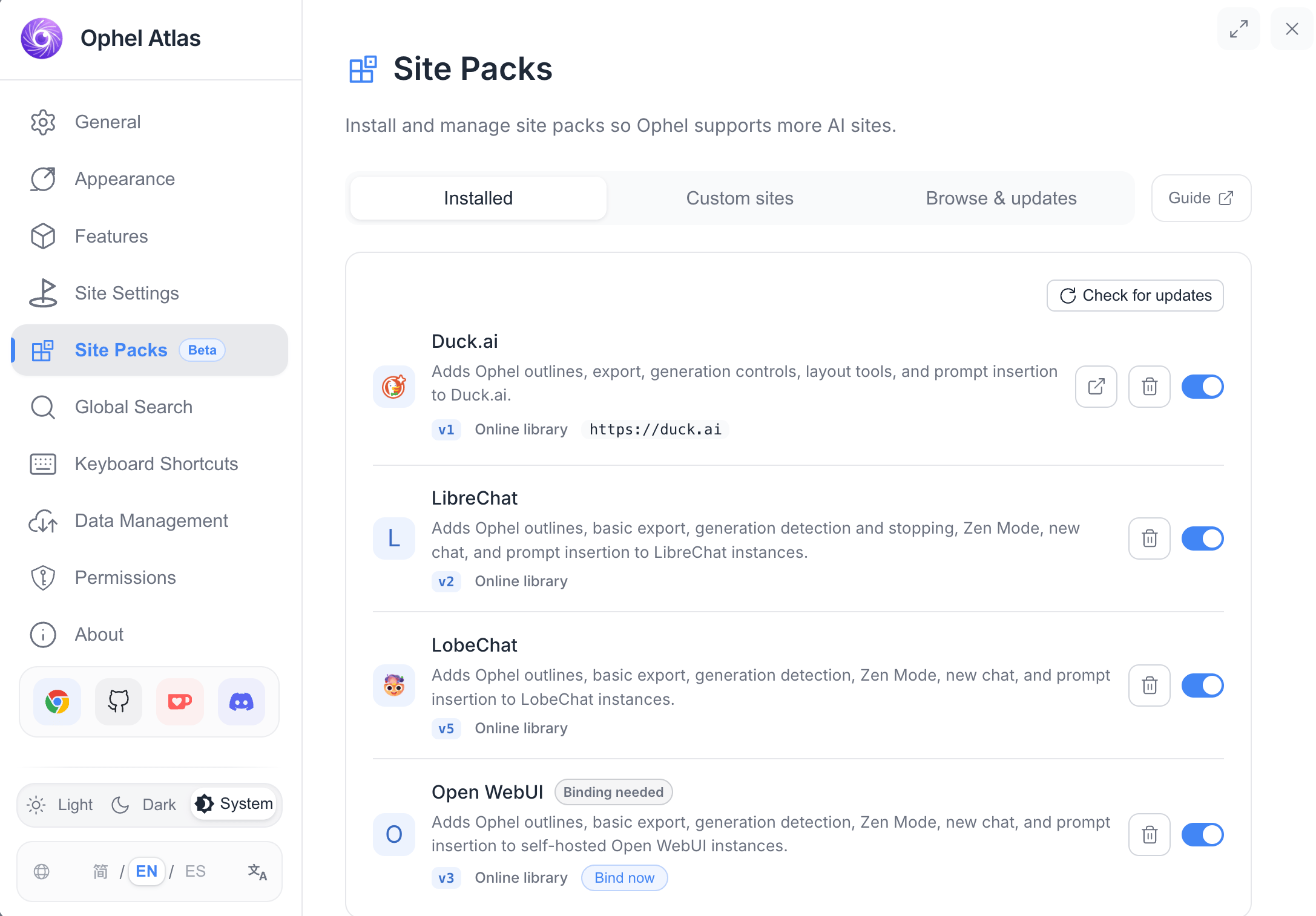
Open **Settings → Site Packs**. The same management page is available from the extension Options page and the in-page settings dialog.
Tabs in the current UI:
| Tab | Purpose |
| -------------------- | ------------------------------------------------------------------------ |
| **Installed** | Enable, disable, reauthorize, uninstall, and open pack guides |
| **Custom sites** | Bind an exact HTTPS origin to an installed pack |
| **Browse & updates** | Online pack library, refresh registry, install/update, local JSON import |
A **Guide** button in the settings toolbar opens this documentation on ophel.app.
## Example packs in the community registry
The registry source currently ships these community manifests under `registry/sites/`:
| Pack ID | Typical target | Match style |
| ------------ | ------------------------------------------ | ------------------------------------- |
| `duck-ai` | [duck.ai](https://duck.ai) | Static `https://duck.ai/*` |
| `lobechat` | [app.lobehub.com](https://app.lobehub.com) | Static `https://app.lobehub.com/*` |
| `librechat` | Self-hosted LibreChat | Empty `matches`; bind a custom origin |
| `nextchat` | Self-hosted NextChat | Empty `matches`; bind a custom origin |
| `open-webui` | Self-hosted Open WebUI | Empty `matches`; bind a custom origin |
Exact capability sets differ by pack. Install a pack and inspect its declared capabilities, or open the JSON in the [ophel registry](https://github.com/urzeye/ophel/tree/main/registry/sites) for the source of truth.
## Security model in one page
* No arbitrary JavaScript, remote code, or executable callbacks
* HTTPS origins only; HTTP custom bindings are rejected
* Optional host permission and dynamic content-script registration in the extension
* Registry index is Ed25519-signed; package files are SHA-256 pinned
* Failed or invalid updates keep the last-known-good installed state
* Built-in site IDs and domains cannot be claimed by a pack
## Next steps
1. [Install a pack](/docs/enhancements/site-extensions/installation) from the online library or a local JSON file.
2. For self-hosted apps, bind the exact HTTPS origin under **Custom sites**.
3. If you are writing a pack, read the [capabilities reference](/docs/enhancements/site-extensions/capabilities) and [authoring guide](/docs/enhancements/site-extensions/authoring).
## Choose a path
| Goal | Start here |
| --------------------------------------- | -------------------------------------------------------------------- |
| Install a community or self-hosted pack | [Install and manage](/docs/enhancements/site-extensions/installation) |
| Understand what each capability unlocks | [Capabilities reference](/docs/enhancements/site-extensions/capabilities) |
| Create or contribute a pack | [Author a Site Extension](/docs/enhancements/site-extensions/authoring) |
| Permissions, updates, and limitations | [Site Extension FAQ](/docs/enhancements/site-extensions/faq) |
## What a Site Extension can provide
A pack only unlocks the controls that match its declared capabilities. Depending on the pack, that may include:
* conversation outlines and user-query headings
* prompt insertion and submit behavior
* basic conversation export
* generation and stop-button detection
* new-chat actions
* width, Zen mode, clean mode, or panel avoidance
* reading history, model locking, or conversation-list integration when the required configuration is present
The management page and site-settings UI hide unsupported controls automatically. A pack should therefore declare only behavior that has been verified on the target site.
## Built-in adapters vs Site Extensions
| | Built-in adapters | Site Extensions (Site Packs) |
| -------- | ------------------------------------------------------------------ | ----------------------------------------------------------------------------------- |
| Format | TypeScript adapters shipped with Ophel | Declarative JSON only |
| Priority | Always win on their domains | Cannot override a built-in site |
| Scope | Complex or site-private behavior | Selector- and config-driven integrations |
| Updates | App releases, plus signed selector patches for configured builtins | Registry updates or local re-import |
| Trust | Reviewed as product code | Registry signature + local schema validation, or local import from a trusted source |
Selector-only hotfixes for configured built-in adapters use the signed **patch** channel in the same registry. They are not Site Extensions and cannot introduce a new site.
## Trust boundary
Registry packages are downloaded from immutable version paths, checked against a signed registry index and SHA-256 package digests, then validated again locally before activation.
Local JSON imports still pass the runtime validator, but they **skip** the registry signature chain and do **not** auto-update. Import only from a source you trust, and review domains and capabilities first.
Site Extensions can change page styles and Ophel behavior on matched origins. Treat unknown local JSON the same way you would treat an unreviewed configuration file.
## Where to manage packs
Open **Settings → Site Packs**. The same management page is available from the extension Options page and the in-page settings dialog.
Tabs in the current UI:
| Tab | Purpose |
| -------------------- | ------------------------------------------------------------------------ |
| **Installed** | Enable, disable, reauthorize, uninstall, and open pack guides |
| **Custom sites** | Bind an exact HTTPS origin to an installed pack |
| **Browse & updates** | Online pack library, refresh registry, install/update, local JSON import |
A **Guide** button in the settings toolbar opens this documentation on ophel.app.
## Example packs in the community registry
The registry source currently ships these community manifests under `registry/sites/`:
| Pack ID | Typical target | Match style |
| ------------ | ------------------------------------------ | ------------------------------------- |
| `duck-ai` | [duck.ai](https://duck.ai) | Static `https://duck.ai/*` |
| `lobechat` | [app.lobehub.com](https://app.lobehub.com) | Static `https://app.lobehub.com/*` |
| `librechat` | Self-hosted LibreChat | Empty `matches`; bind a custom origin |
| `nextchat` | Self-hosted NextChat | Empty `matches`; bind a custom origin |
| `open-webui` | Self-hosted Open WebUI | Empty `matches`; bind a custom origin |
Exact capability sets differ by pack. Install a pack and inspect its declared capabilities, or open the JSON in the [ophel registry](https://github.com/urzeye/ophel/tree/main/registry/sites) for the source of truth.
## Security model in one page
* No arbitrary JavaScript, remote code, or executable callbacks
* HTTPS origins only; HTTP custom bindings are rejected
* Optional host permission and dynamic content-script registration in the extension
* Registry index is Ed25519-signed; package files are SHA-256 pinned
* Failed or invalid updates keep the last-known-good installed state
* Built-in site IDs and domains cannot be claimed by a pack
## Next steps
1. [Install a pack](/docs/enhancements/site-extensions/installation) from the online library or a local JSON file.
2. For self-hosted apps, bind the exact HTTPS origin under **Custom sites**.
3. If you are writing a pack, read the [capabilities reference](/docs/enhancements/site-extensions/capabilities) and [authoring guide](/docs/enhancements/site-extensions/authoring).