> ## Documentation Index
> Fetch the complete documentation index at: https://ophel.app/docs/llms.txt
> Use this file to discover all available pages before exploring further.
# Install and manage Site Extensions
> Install Site Extensions from the online library or local JSON, grant host access, bind self-hosted origins, and keep packs updated.
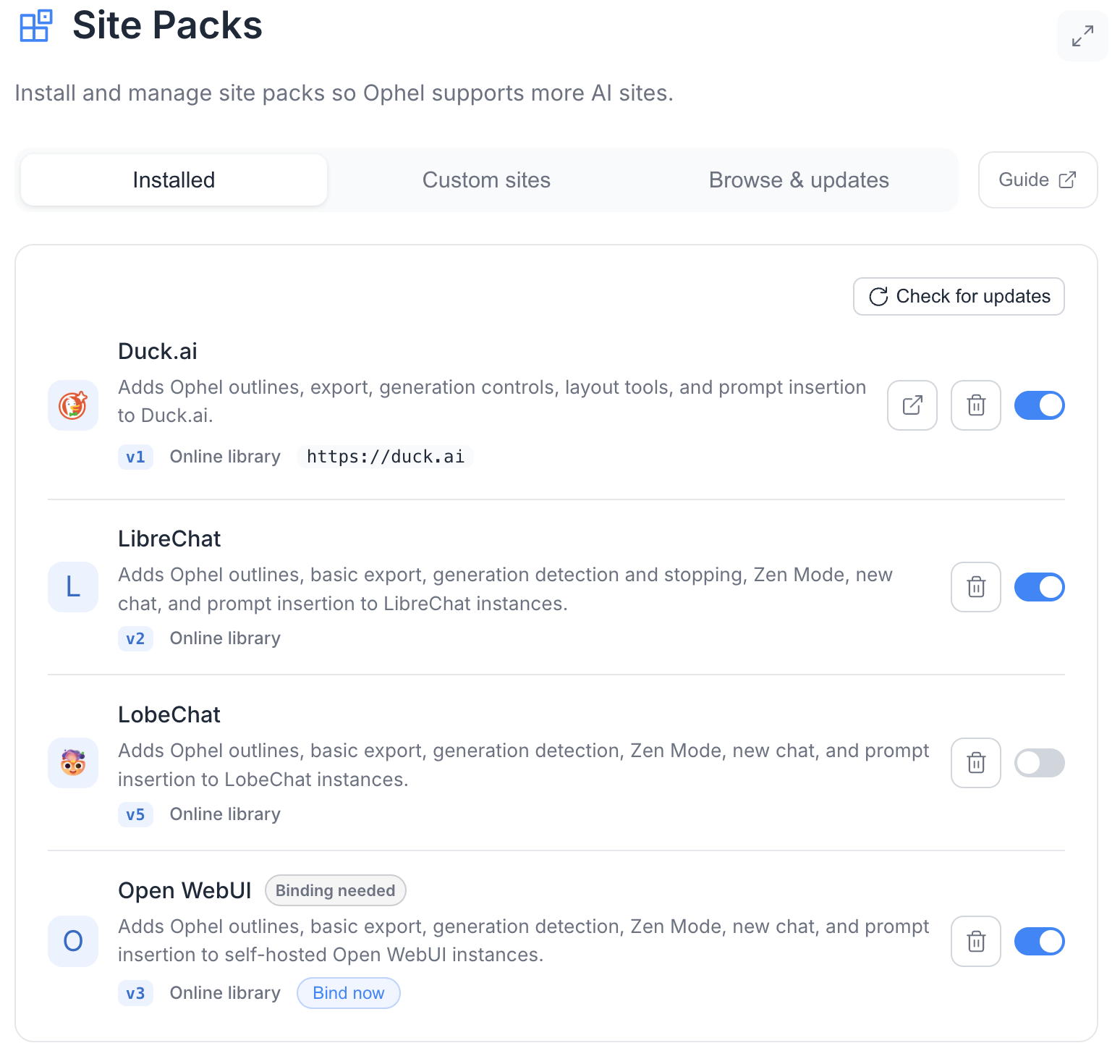
Open **Settings → Site Packs**. The same management page is available from the extension Options page and the in-page settings dialog.
 ## Install from the online pack library
1. Open the **Browse & updates** tab.
2. Under **Online pack library**, select **Refresh** / refresh the registry if the list is empty or stale.
3. Review the pack name, version, target domain or self-hosted badge, description, and compatibility status.
4. Select **Install**.
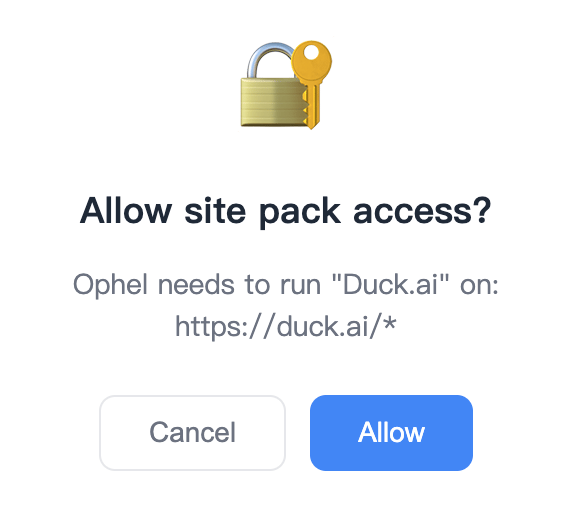
5. In the browser extension, approve the requested target-domain permission. Ophel requests only the HTTPS origins referenced by the pack or binding.
6. Reload the target site after installation completes.
Registry packs update through the signed remote registry. Before replacing an installed version, Ophel verifies:
* the signed index
* the immutable package digest
* the pack's `minAppVersion`
* the complete runtime schema
Default registry sources:
```text theme={}
https://cdn.jsdelivr.net/gh/urzeye/ophel@registry-dist/index.json
https://raw.githubusercontent.com/urzeye/ophel/registry-dist/index.json
```
The client checks the registry about every 24 hours. A failed or invalid download does not replace the last-known-good installed state.
## Import a local JSON pack
Use **Local JSON import** when testing a pack you created or received outside the community library.
1. Select the import control and choose a `.json` file.
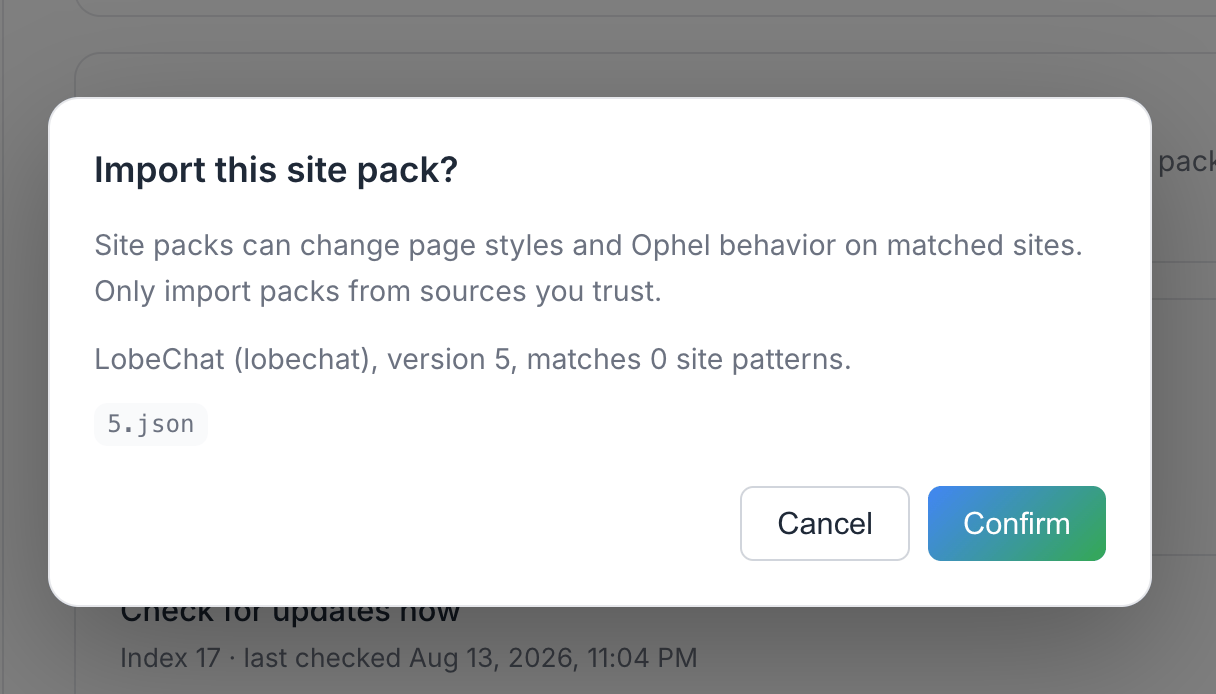
2. Review the confirmation dialog: pack name, ID, version, match-pattern count, and risk notice.
3. Confirm the import.
4. Approve target-domain permission in the extension when prompted, then reload the site.
Local imports are validated by the same runtime rules as registry packs, but they are:
* **not** authenticated by the community registry signature
* **not** auto-updated
Install a newer local file when you want to replace one.
## Install from the online pack library
1. Open the **Browse & updates** tab.
2. Under **Online pack library**, select **Refresh** / refresh the registry if the list is empty or stale.
3. Review the pack name, version, target domain or self-hosted badge, description, and compatibility status.
4. Select **Install**.
5. In the browser extension, approve the requested target-domain permission. Ophel requests only the HTTPS origins referenced by the pack or binding.
6. Reload the target site after installation completes.
Registry packs update through the signed remote registry. Before replacing an installed version, Ophel verifies:
* the signed index
* the immutable package digest
* the pack's `minAppVersion`
* the complete runtime schema
Default registry sources:
```text theme={}
https://cdn.jsdelivr.net/gh/urzeye/ophel@registry-dist/index.json
https://raw.githubusercontent.com/urzeye/ophel/registry-dist/index.json
```
The client checks the registry about every 24 hours. A failed or invalid download does not replace the last-known-good installed state.
## Import a local JSON pack
Use **Local JSON import** when testing a pack you created or received outside the community library.
1. Select the import control and choose a `.json` file.
2. Review the confirmation dialog: pack name, ID, version, match-pattern count, and risk notice.
3. Confirm the import.
4. Approve target-domain permission in the extension when prompted, then reload the site.
Local imports are validated by the same runtime rules as registry packs, but they are:
* **not** authenticated by the community registry signature
* **not** auto-updated
Install a newer local file when you want to replace one.
 ## Extension permissions
The extension uses optional host permissions and dynamic content-script registration for Site Pack origins.
* Installation or binding is rolled back if required permission is denied, so a half-installed pack is not left active.
* After restoring a backup on another browser, pack data is restored, but domain permission must be granted again. The Site Packs page lists packs under **Reauthorize restored site packs**.
* Disabling or uninstalling the last pack that references an origin removes its dynamic registration. If several packs or custom bindings share one origin, Ophel keeps the registration until the final reference is removed.
## Extension permissions
The extension uses optional host permissions and dynamic content-script registration for Site Pack origins.
* Installation or binding is rolled back if required permission is denied, so a half-installed pack is not left active.
* After restoring a backup on another browser, pack data is restored, but domain permission must be granted again. The Site Packs page lists packs under **Reauthorize restored site packs**.
* Disabling or uninstalling the last pack that references an origin removes its dynamic registration. If several packs or custom bindings share one origin, Ophel keeps the registration until the final reference is removed.
 ## Bind a custom origin
Custom origins support self-hosted or same-application deployments whose domain is not listed in a pack's static `matches`.
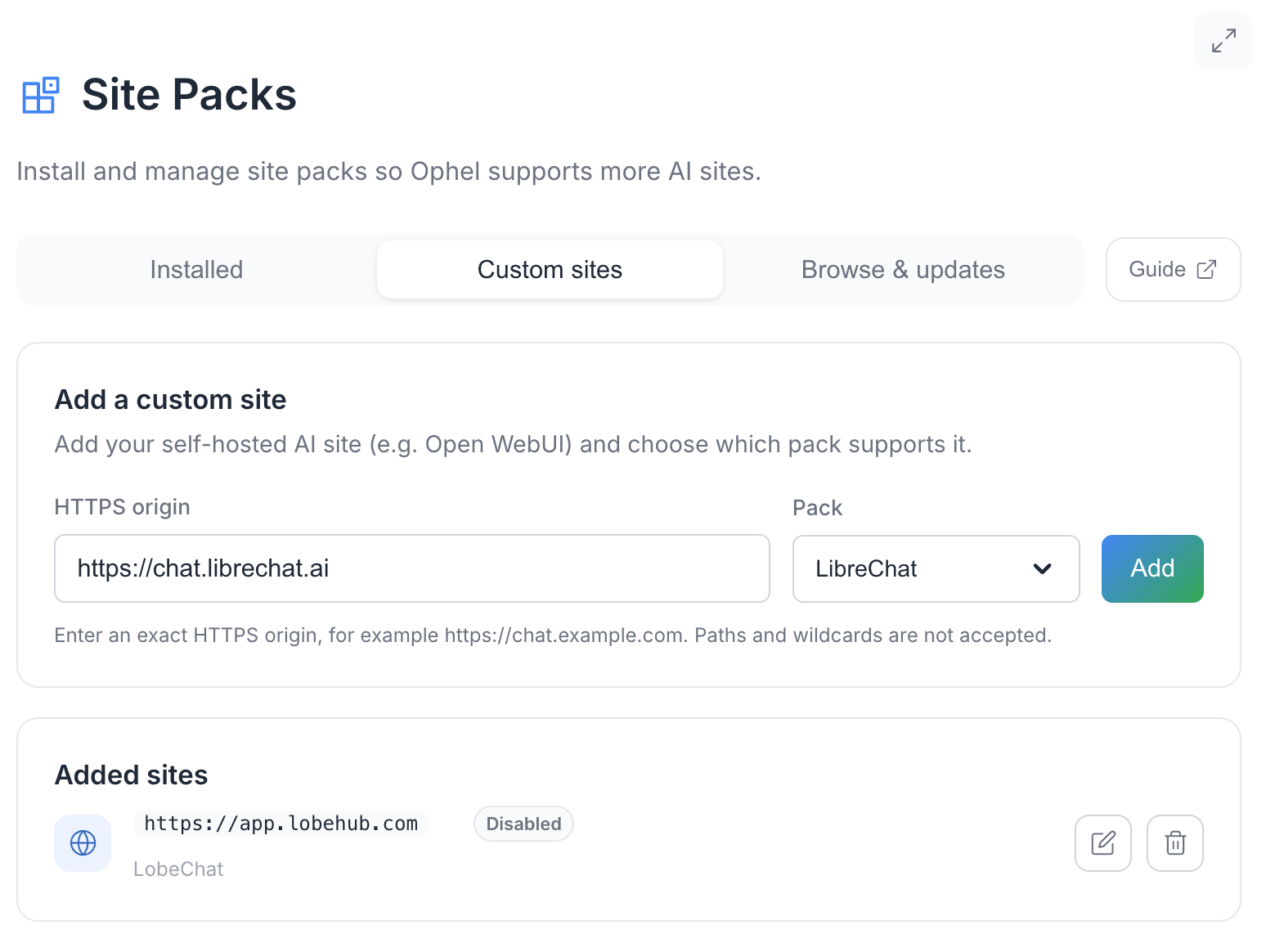
Typical self-hosted packs ship with `matches: []` and show a **Binding needed** / **Self-hosted** badge until you add an origin.
1. Open the **Custom sites** tab.
2. Enter an exact HTTPS origin such as `https://chat.example.com`.
Paths and wildcards are rejected.
3. Choose an installed pack.
4. Save the binding.
5. Approve host permission in the extension.
6. Reload the bound origin.
The selected pack always activates on that origin. Ophel stores each instance under a key derived from pack ID and origin, so settings, themes, reading history, and conversations do not mix between two deployments of the same pack.
## Bind a custom origin
Custom origins support self-hosted or same-application deployments whose domain is not listed in a pack's static `matches`.
Typical self-hosted packs ship with `matches: []` and show a **Binding needed** / **Self-hosted** badge until you add an origin.
1. Open the **Custom sites** tab.
2. Enter an exact HTTPS origin such as `https://chat.example.com`.
Paths and wildcards are rejected.
3. Choose an installed pack.
4. Save the binding.
5. Approve host permission in the extension.
6. Reload the bound origin.
The selected pack always activates on that origin. Ophel stores each instance under a key derived from pack ID and origin, so settings, themes, reading history, and conversations do not mix between two deployments of the same pack.
 ## Update, disable, or uninstall
| Action | Result |
| -------------------------------- | ------------------------------------------------------------------------------------------------------ |
| **Check for updates** | Compares an installed registry pack with the latest compatible registry version |
| **Disable** | Keeps the pack installed but removes it from adapter activation and origin references |
| **Uninstall** | Removes the manifest and its registration references. Site settings and conversation data are retained |
| Registry disabled / incompatible | The management page shows the reason instead of silently activating the pack |
When a registry pack requires a newer Ophel version, the UI shows **Requires Ophel {version} or newer**.
## Status badges you may see
| Status | Meaning |
| ------------------------------------- | ------------------------------------------------------------ |
| **Available** | Pack can activate with current permission and match coverage |
| **Disabled** | Installed but turned off |
| **Incompatible** | App version or registry state cannot activate the pack |
| **Self-hosted** / **Binding needed** | Pack has no static matches and needs a custom origin |
| **Removed from library** | Registry entry is no longer available |
| **Online library** / **Local import** | Pack source |
## Troubleshooting install problems
If a pack installs but the site is not recognized:
1. Confirm the pack is enabled.
2. Reload the target tab after granting permission.
3. Check that the current origin matches the pack or custom binding exactly, including scheme and host.
4. For self-hosted packs, confirm a custom origin binding exists.
5. If the pack is from the online library, check for a newer version.
6. If the latest pack still fails, open a GitHub issue with the site URL, pack version, Ophel version, and failed selector names — without private conversation content.
## Related pages
* [Site Extensions overview](/docs/enhancements/site-extensions)
* [Capabilities reference](/docs/enhancements/site-extensions/capabilities)
* [Author a Site Extension](/docs/enhancements/site-extensions/authoring)
* [Site Extension FAQ](/docs/enhancements/site-extensions/faq)
* [Permissions](/docs/data/permissions)
## Update, disable, or uninstall
| Action | Result |
| -------------------------------- | ------------------------------------------------------------------------------------------------------ |
| **Check for updates** | Compares an installed registry pack with the latest compatible registry version |
| **Disable** | Keeps the pack installed but removes it from adapter activation and origin references |
| **Uninstall** | Removes the manifest and its registration references. Site settings and conversation data are retained |
| Registry disabled / incompatible | The management page shows the reason instead of silently activating the pack |
When a registry pack requires a newer Ophel version, the UI shows **Requires Ophel {version} or newer**.
## Status badges you may see
| Status | Meaning |
| ------------------------------------- | ------------------------------------------------------------ |
| **Available** | Pack can activate with current permission and match coverage |
| **Disabled** | Installed but turned off |
| **Incompatible** | App version or registry state cannot activate the pack |
| **Self-hosted** / **Binding needed** | Pack has no static matches and needs a custom origin |
| **Removed from library** | Registry entry is no longer available |
| **Online library** / **Local import** | Pack source |
## Troubleshooting install problems
If a pack installs but the site is not recognized:
1. Confirm the pack is enabled.
2. Reload the target tab after granting permission.
3. Check that the current origin matches the pack or custom binding exactly, including scheme and host.
4. For self-hosted packs, confirm a custom origin binding exists.
5. If the pack is from the online library, check for a newer version.
6. If the latest pack still fails, open a GitHub issue with the site URL, pack version, Ophel version, and failed selector names — without private conversation content.
## Related pages
* [Site Extensions overview](/docs/enhancements/site-extensions)
* [Capabilities reference](/docs/enhancements/site-extensions/capabilities)
* [Author a Site Extension](/docs/enhancements/site-extensions/authoring)
* [Site Extension FAQ](/docs/enhancements/site-extensions/faq)
* [Permissions](/docs/data/permissions)