> ## Documentation Index
> Fetch the complete documentation index at: https://ophel.app/docs/llms.txt
> Use this file to discover all available pages before exploring further.
# 外观与主题 — 24 套预设与自定义 CSS
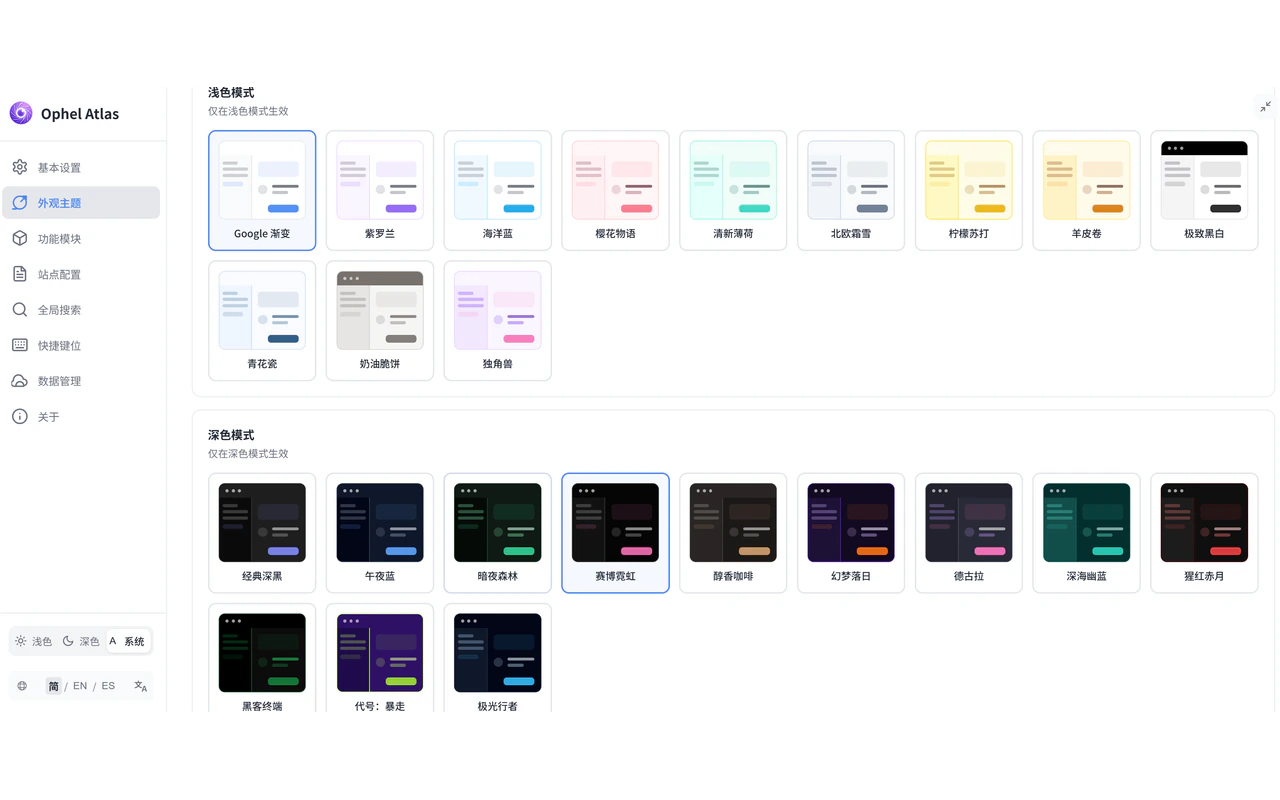
> Ophel 提供亮色/暗色各 12 套主题预设,支持自定义 CSS 变量和主题预设保存,View Transitions 动画切换。
export const ThemePresetGrid = ({mode = "light", locale = "en"}) => {
const presets = {
light: [{
id: "google-gradient",
en: ["Google Gradient", "Clean white with a blue-green gradient header"],
zh: ["Google 渐变", "简洁白底,蓝绿渐变页头"],
default: true,
colors: {
bg: "#ffffff",
secondary: "#f9fafb",
tertiary: "#f3f4f6",
text: "#1f2937",
muted: "#6b7280",
primary: "#4285f4",
border: "#e5e7eb",
header: "linear-gradient(135deg, #4285f4 0%, #34a853 100%)",
card: "#ffffff"
}
}, {
id: "purple",
en: ["Violet", "Soft purple accent palette"],
zh: ["紫罗兰", "柔和紫色调"],
colors: {
bg: "#ffffff",
secondary: "#faf5ff",
tertiary: "#f3e8ff",
text: "#1f2937",
muted: "#6b7280",
primary: "#8b5cf6",
border: "#e9d5ff",
header: "linear-gradient(135deg, #8b5cf6 0%, #a855f7 100%)",
card: "#ffffff"
}
}, {
id: "ocean",
en: ["Ocean Blue", "Calm sea-blue tones"],
zh: ["海洋蓝", "宁静蓝色系"],
colors: {
bg: "#ffffff",
secondary: "#f0f9ff",
tertiary: "#e0f2fe",
text: "#1f2937",
muted: "#6b7280",
primary: "#0ea5e9",
border: "#bae6fd",
header: "linear-gradient(135deg, #0ea5e9 0%, #06b6d4 100%)",
card: "#ffffff"
}
}, {
id: "sakura",
en: ["Sakura", "Delicate pink blossom palette"],
zh: ["樱花物语", "精致粉色花瓣调"],
colors: {
bg: "#fff5f7",
secondary: "#fff0f3",
tertiary: "#ffe4e9",
text: "#4a0418",
muted: "#9d4f64",
primary: "#fb7185",
border: "#fecdd3",
header: "linear-gradient(135deg, #ff9a9e 0%, #fad0c4 100%)",
card: "#ffffff"
}
}, {
id: "mint",
en: ["Mint", "Fresh mint-green highlights"],
zh: ["清新薄荷", "清爽绿色高亮"],
colors: {
bg: "#f0fdf9",
secondary: "#e6fffa",
tertiary: "#ccfbf1",
text: "#134e4a",
muted: "#2d7a74",
primary: "#2dd4bf",
border: "#99f6e4",
header: "linear-gradient(135deg, #14b8a6 0%, #34d399 100%)",
card: "#ffffff"
}
}, {
id: "nordic",
en: ["Nordic Frost", "Cool Nordic minimalism"],
zh: ["北欧霜雪", "冷调北欧极简风"],
colors: {
bg: "#f8fafc",
secondary: "#f1f5f9",
tertiary: "#e2e8f0",
text: "#0f172a",
muted: "#475569",
primary: "#64748b",
border: "#cbd5e1",
header: "linear-gradient(135deg, #64748b 0%, #475569 100%)",
card: "#ffffff"
}
}, {
id: "lemon-soda",
en: ["Lemon Soda", "Cheerful yellow-citrus palette"],
zh: ["柠檬苏打", "明快黄柠檬色"],
colors: {
bg: "#fefce8",
secondary: "#fef9c3",
tertiary: "#fde047",
text: "#854d0e",
muted: "#a16207",
primary: "#eab308",
border: "#fde047",
header: "linear-gradient(135deg, #eab308 0%, #84cc16 100%)",
card: "#ffffff"
}
}, {
id: "ancient-scroll",
en: ["Ancient Scroll", "Warm parchment and sepia tones"],
zh: ["羊皮卷", "温暖羊皮纸和棕褐色调"],
colors: {
bg: "#fffbeb",
secondary: "#fef3c7",
tertiary: "#fde68a",
text: "#451a03",
muted: "#92400e",
primary: "#d97706",
border: "#fde68a",
header: "linear-gradient(135deg, #d97706 0%, #92400e 100%)",
card: "#fffbeb"
}
}, {
id: "mono-pro",
en: ["Mono Pro", "Minimal black-and-white typography"],
zh: ["极致黑白", "纯净黑白排版风格"],
colors: {
bg: "#ffffff",
secondary: "#f4f4f5",
tertiary: "#e4e4e7",
text: "#09090b",
muted: "#52525b",
primary: "#18181b",
border: "#e4e4e7",
header: "#000000",
card: "#ffffff"
}
}, {
id: "porcelain",
en: ["Blue-and-white porcelain", "Classic Chinese porcelain blue"],
zh: ["青花瓷", "中国青花瓷传统蓝白"],
colors: {
bg: "#f9fbff",
secondary: "#eff6ff",
tertiary: "#e0e7ff",
text: "#1e4e79",
muted: "#4e7ca1",
primary: "#1e4e79",
border: "rgba(78, 124, 161, 0.2)",
header: "linear-gradient(135deg, #1e4e79 0%, #2c3e50 100%)",
card: "#ffffff"
}
}, {
id: "shortbread",
en: ["Shortbread", "Warm cream and biscuit tones"],
zh: ["奶油脆饼", "温暖奶油饼干色调"],
colors: {
bg: "#f5f5f4",
secondary: "#e7e5e4",
tertiary: "#d6d3d1",
text: "#44403c",
muted: "#78716c",
primary: "#78716c",
border: "#d6d3d1",
header: "#78716c",
card: "#ffffff"
}
}, {
id: "unicorn-dream",
en: ["Unicorn Dream", "Pastel gradient dream theme"],
zh: ["独角兽", "淡粉彩虹渐变梦幻"],
colors: {
bg: "#faf5ff",
secondary: "#f3e8ff",
tertiary: "#e9d5ff",
text: "#5b21b6",
muted: "#7c3aed",
primary: "#f472b6",
border: "#e9d5ff",
header: "linear-gradient(135deg, #f472b6 0%, #22d3ee 50%, #a78bfa 100%)",
card: "#ffffff"
}
}],
dark: [{
id: "classic-dark",
en: ["Classic Dark", "Deep gray panel, timeless and readable"],
zh: ["经典深黑", "深灰面板,经典可读"],
default: true,
colors: {
bg: "#1e1e1e",
secondary: "#0b0b0b",
tertiary: "#262626",
text: "#e3e3e3",
muted: "#a0a0a0",
primary: "#818cf8",
border: "#333333",
header: "#1e1e1e",
card: "#0b0b0b"
}
}, {
id: "midnight-blue",
en: ["Midnight Blue", "Deep blue night palette"],
zh: ["午夜蓝", "深蓝夜色"],
colors: {
bg: "#0f172a",
secondary: "#020617",
tertiary: "#1e293b",
text: "#e2e8f0",
muted: "#94a3b8",
primary: "#60a5fa",
border: "#334155",
header: "linear-gradient(135deg, #1e40af 0%, #3b82f6 100%)",
card: "#020617"
}
}, {
id: "forest",
en: ["Dark Forest", "Muted green shadows"],
zh: ["暗夜森林", "暗绿色影调"],
colors: {
bg: "#0f1a14",
secondary: "#050a07",
tertiary: "#14261c",
text: "#d1fae5",
muted: "#86efac",
primary: "#34d399",
border: "#1f3d2b",
header: "linear-gradient(135deg, #065f46 0%, #10b981 100%)",
card: "#050a07"
}
}, {
id: "cyberpunk",
en: ["Cyberpunk Neon", "Electric neon on dark"],
zh: ["赛博霓虹", "霓虹灯电光暗色"],
colors: {
bg: "#050505",
secondary: "#121212",
tertiary: "#1a1a1a",
text: "#e0e0e0",
muted: "#a0a0a0",
primary: "#f472b6",
border: "#333333",
header: "linear-gradient(45deg, #000000 0%, #1a1a1a 100%)",
card: "#0a0a0a"
}
}, {
id: "coffee",
en: ["Roasted Coffee", "Warm brown dark palette"],
zh: ["醇香咖啡", "温暖棕色暗色调"],
colors: {
bg: "#1c1917",
secondary: "#292524",
tertiary: "#44403c",
text: "#e7e5e4",
muted: "#a8a29e",
primary: "#d4a373",
border: "#44403c",
header: "#292524",
card: "#292524"
}
}, {
id: "sunset",
en: ["Sunset Dream", "Purple-orange sunset gradient"],
zh: ["幻梦落日", "紫橙落日渐变"],
colors: {
bg: "#120a21",
secondary: "#1d1136",
tertiary: "#2a1b4b",
text: "#f3e8ff",
muted: "#d8b4fe",
primary: "#f97316",
border: "#4c1d95",
header: "linear-gradient(135deg, #4c1d95 0%, #be185d 100%)",
card: "#1d1136"
}
}, {
id: "dracula",
en: ["Dracula", "The beloved Dracula color scheme"],
zh: ["德古拉", "经典吸血鬼色方案"],
colors: {
bg: "#282a36",
secondary: "#21222c",
tertiary: "#44475a",
text: "#f8f8f2",
muted: "#bd93f9",
primary: "#ff79c6",
border: "#44475a",
header: "#21222c",
card: "#21222c"
}
}, {
id: "deep-abyss",
en: ["Deep Abyss", "Almost-black ultra-deep dark"],
zh: ["深海幽蓝", "近乎纯黑的深邃暗色"],
colors: {
bg: "#042f2e",
secondary: "#134e4a",
tertiary: "#115e59",
text: "#ccfbf1",
muted: "#5eead4",
primary: "#2dd4bf",
border: "#115e59",
header: "linear-gradient(135deg, #0f766e 0%, #0369a1 100%)",
card: "#134e4a"
}
}, {
id: "crimson-moon",
en: ["Crimson Moon", "Dark red and crimson accents"],
zh: ["猩红赤月", "暗底深红点缀"],
colors: {
bg: "#0f0f0f",
secondary: "#1c1c1c",
tertiary: "#2a2a2a",
text: "#fecaca",
muted: "#f87171",
primary: "#ef4444",
border: "#450a0a",
header: "linear-gradient(135deg, #7f1d1d 0%, #991b1b 100%)",
card: "#1c1c1c"
}
}, {
id: "retro-terminal",
en: ["Retro Terminal", "Green-on-black terminal look"],
zh: ["黑客终端", "绿字黑底复古终端风"],
colors: {
bg: "#0c0c0c",
secondary: "#000000",
tertiary: "#1a1a1a",
text: "#22c55e",
muted: "#15803d",
primary: "#15803d",
border: "#14532d",
header: "#000000",
card: "#000000"
}
}, {
id: "eva-unit-01",
en: ["EVA Unit-01", "Purple-and-green mecha-inspired"],
zh: ["代号:暴走", "紫绿机甲风格"],
colors: {
bg: "#2e1065",
secondary: "#1e0b4b",
tertiary: "#4c1d95",
text: "#d9f99d",
muted: "#bef264",
primary: "#a3e635",
border: "#d9f99d",
header: "linear-gradient(135deg, #4c1d95 0%, #a3e635 100%)",
card: "#1e0b4b"
}
}, {
id: "aurora",
en: ["Aurora", "Cool teal aurora borealis"],
zh: ["极光行者", "蓝绿北极光色调"],
colors: {
bg: "#020617",
secondary: "#0f172a",
tertiary: "#1e293b",
text: "#e0f2fe",
muted: "#bae6fd",
primary: "#38bdf8",
border: "#1e293b",
header: "linear-gradient(135deg, #0f172a 0%, #1e40af 100%)",
card: "#0f172a"
}
}]
};
const labels = {
en: {
default: "Default"
},
zh: {
default: "默认"
}
};
const line = (width, color) => ({
width,
height: 4,
borderRadius: 999,
background: color,
opacity: 0.72
});
const ThemePreview = ({colors}) => ;
const ThemeCard = ({preset, locale}) => {
const [name, description] = preset[locale];
return
{ThemePreview({
colors: preset.colors
})}
{name}
{preset.default ?
{labels[locale].default}
: null}
{description}
{presets[mode].map(preset =>
{ThemeCard({
preset,
locale
})}
)}
{isZh ? "跨平台按键说明" : "Cross-platform key mapping"}
{isZh ? <>
文档中的快捷键会同时显示 Windows/Linux 与 Mac 写法:
Ctrl 对应 Command,
Alt 对应 Option。唯一例外是提示词发送,
Ctrl+Enter 在 Mac 上也使用 Ctrl+Enter。
: <>
Shortcuts show both Windows/Linux and Mac keys: Ctrl maps
to Command, and Alt maps to
Option. Prompt submit is the only exception:
Ctrl+Enter remains Ctrl+Enter on Mac.
}
;
};
export const Shortcut = ({combo, mac, sameOnMac = false}) => {
const keyLabels = {
arrowup: {
win: "Up",
mac: "↑"
},
arrowdown: {
win: "Down",
mac: "↓"
},
arrowleft: {
win: "Left",
mac: "←"
},
arrowright: {
win: "Right",
mac: "→"
},
up: {
win: "Up",
mac: "↑"
},
down: {
win: "Down",
mac: "↓"
},
left: {
win: "Left",
mac: "←"
},
right: {
win: "Right",
mac: "→"
},
esc: {
win: "Esc",
mac: "Esc"
},
escape: {
win: "Esc",
mac: "Esc"
},
enter: {
win: "Enter",
mac: "Enter"
},
shift: {
win: "Shift",
mac: "⇧"
},
backslash: {
win: "\\",
mac: "\\"
}
};
const modifierLabels = {
ctrl: {
win: "Ctrl",
mac: "⌘"
},
control: {
win: "Ctrl",
mac: "⌘"
},
cmd: {
win: "Ctrl",
mac: "⌘"
},
command: {
win: "Ctrl",
mac: "⌘"
},
alt: {
win: "Alt",
mac: "⌥"
},
option: {
win: "Alt",
mac: "⌥"
},
shift: {
win: "Shift",
mac: "⇧"
}
};
const normalizeToken = token => String(token || "").trim();
const formatKey = (token, platform) => {
const normalized = normalizeToken(token);
const key = normalized.toLowerCase();
const mapped = keyLabels[key];
if (mapped) return mapped[platform];
if (normalized.length === 1) return normalized.toUpperCase();
return normalized;
};
const formatCombo = (value, platform) => String(value || "").split("+").map(normalizeToken).filter(Boolean).map(token => {
const mapped = modifierLabels[token.toLowerCase()];
return mapped ? mapped[platform] : formatKey(token, platform);
}).join(platform === "mac" ? "" : "+");
const windowsLabel = formatCombo(combo, "win");
const macLabel = sameOnMac ? windowsLabel : mac || formatCombo(combo, "mac");
const title = windowsLabel === macLabel ? windowsLabel : `Windows/Linux: ${windowsLabel}; Mac: ${macLabel}`;
return
{windowsLabel}
{windowsLabel !== macLabel && <>
/
{macLabel}
}
;
};
export const Icon = ({src, alt}) =>  ;
;
 ## 亮色 / 暗色模式
Ophel 支持三种模式:
* **浅色** — 始终使用亮色主题
* **深色** — 始终使用暗色主题
* **跟随系统** — 自动跟随操作系统的外观设置
可通过浮动按钮组中的 主题切换按钮、快捷键 ,或 **设置 → 外观** 切换。
开启**跟随站点主题**后,当 AI 平台(如 Gemini、ChatGPT)切换亮/暗模式时,Ophel
面板也会随之切换。可在 **设置 → 外观 → 跟随站点主题**
中控制,主题模式按站点独立保存。
### 同步原生页面颜色
开启后,Ophel 会在切换亮/暗模式时,同步调整 AI 平台页面上部分原生元素(如输入框、滚动条)的颜色,使整体视觉更一致。此功能仅对部分站点生效。
**设置路径:设置 → 外观 → 同步原生页面颜色**(默认开启)
当前站点的亮/暗模式始终跟随 Ophel 的设置。此选项仅控制是否额外同步页面原生元素颜色——如果某个站点出现视觉冲突,可关闭此项。
## 内置主题预设
每种模式各提供 12 套预设主题。
## 选择主题
按 ,或点击面板标题栏的 设置图标。
在设置页面中点击 **外观**。
切换顶部的"浅色"或"深色"标签,点击任意预设卡片即可预览并应用。
切换时会播放从点击位置向外辐射的圆形扩散动画(View Transitions API)。
## 自定义 CSS
在 **设置 → 外观 → 自定义 CSS** 中输入自己的 CSS 规则,实现全面定制。面板运行在 Shadow DOM 中,样式与页面其他部分完全隔离。
面板的样式使用 `--gh-` 前缀的 CSS 变量。你可以在自定义 CSS 中覆盖任意变量:
```css theme={}
:host {
--gh-bg: #1a1a2e;
--gh-primary: #e94560;
--gh-text: #eaeaea;
}
```
常用变量:
| 变量 | 控制范围 |
| --------------------- | ---------------- |
| `--gh-bg` | 主面板背景色 |
| `--gh-bg-secondary` | 次级背景(侧边、交替行) |
| `--gh-text` | 主文字颜色 |
| `--gh-text-secondary` | 次级文字颜色 |
| `--gh-primary` | 强调色 / 激活色(按钮、高亮) |
| `--gh-border` | 边框颜色 |
| `--gh-shadow` | 面板阴影 |
| `--gh-header-bg` | 面板顶栏背景(支持渐变) |
| `--gh-danger` | 删除 / 危险操作颜色 |
| `--gh-hover` | 行悬停背景色 |
更改即时生效,无需刷新页面。
自定义样式可以保存为**自定义主题预设**,在不同主题之间快速切换而不影响全局设置。保存后,该样式会出现在主题预设列表中,与内置预设并列。
## 亮色 / 暗色模式
Ophel 支持三种模式:
* **浅色** — 始终使用亮色主题
* **深色** — 始终使用暗色主题
* **跟随系统** — 自动跟随操作系统的外观设置
可通过浮动按钮组中的 主题切换按钮、快捷键 ,或 **设置 → 外观** 切换。
开启**跟随站点主题**后,当 AI 平台(如 Gemini、ChatGPT)切换亮/暗模式时,Ophel
面板也会随之切换。可在 **设置 → 外观 → 跟随站点主题**
中控制,主题模式按站点独立保存。
### 同步原生页面颜色
开启后,Ophel 会在切换亮/暗模式时,同步调整 AI 平台页面上部分原生元素(如输入框、滚动条)的颜色,使整体视觉更一致。此功能仅对部分站点生效。
**设置路径:设置 → 外观 → 同步原生页面颜色**(默认开启)
当前站点的亮/暗模式始终跟随 Ophel 的设置。此选项仅控制是否额外同步页面原生元素颜色——如果某个站点出现视觉冲突,可关闭此项。
## 内置主题预设
每种模式各提供 12 套预设主题。
## 选择主题
按 ,或点击面板标题栏的 设置图标。
在设置页面中点击 **外观**。
切换顶部的"浅色"或"深色"标签,点击任意预设卡片即可预览并应用。
切换时会播放从点击位置向外辐射的圆形扩散动画(View Transitions API)。
## 自定义 CSS
在 **设置 → 外观 → 自定义 CSS** 中输入自己的 CSS 规则,实现全面定制。面板运行在 Shadow DOM 中,样式与页面其他部分完全隔离。
面板的样式使用 `--gh-` 前缀的 CSS 变量。你可以在自定义 CSS 中覆盖任意变量:
```css theme={}
:host {
--gh-bg: #1a1a2e;
--gh-primary: #e94560;
--gh-text: #eaeaea;
}
```
常用变量:
| 变量 | 控制范围 |
| --------------------- | ---------------- |
| `--gh-bg` | 主面板背景色 |
| `--gh-bg-secondary` | 次级背景(侧边、交替行) |
| `--gh-text` | 主文字颜色 |
| `--gh-text-secondary` | 次级文字颜色 |
| `--gh-primary` | 强调色 / 激活色(按钮、高亮) |
| `--gh-border` | 边框颜色 |
| `--gh-shadow` | 面板阴影 |
| `--gh-header-bg` | 面板顶栏背景(支持渐变) |
| `--gh-danger` | 删除 / 危险操作颜色 |
| `--gh-hover` | 行悬停背景色 |
更改即时生效,无需刷新页面。
自定义样式可以保存为**自定义主题预设**,在不同主题之间快速切换而不影响全局设置。保存后,该样式会出现在主题预设列表中,与内置预设并列。